회원가입 시 이메일 인증 하는 이유
본인인증이 포함되어야 무차별적 회원가입을 막을 수 있다.
로그인, 이메일 인증 과 같이 인증 진행 중 실패시에 응답을 애매하게 줘야 하는 이유
너무 친절한 인증 실패 메세지는 공격자에게 힌트를 주는 것과 같다.
PasswordEncoder
사용자가 회원가입할 때 제공하는 비밀번호를 평문으로 DB에 저장하면 절대 안되고 무조건 암호화 해야한다.
Spring Security가 제공하는 PasswordEncoder를 통해 어떤 알고리즘을 사용해 암호화할지 정할 수 있다.
평소에 같은 평문을 암호화한 해쉬값이 맨날 달라진건 알았지만 왜 그런건진 몰랐는데 이는 솔트 때문이다.
// BcryptPasswordEncoder
@Override
public String encode(CharSequence rawPassword) {
   if (rawPassword == null) {
      throw new IllegalArgumentException("rawPassword cannot be null");
   }
   String salt = getSalt();
   return BCrypt.hashpw(rawPassword.toString(), salt); // 암호화
}

private String getSalt() {
   if (this.random != null) {
      return BCrypt.gensalt(this.version.getVersion(), this.strength, this.random);
   }
   return BCrypt.gensalt(this.version.getVersion(), this.strength);
}솔트는 서버에서 클라이언트에게 받은 평문에 암호화하기전에 임의의 문자열을 덧붙이는 과정이다.
동일한 평문에도 매번 다른 솔트값을 사용해 다양한 암호값을 얻게 되고 이는 보안성을 높인다. 로그인 과정에서는 암호화에 사용한 솔트값을 가져와 평문과 솔트를 덧붙여 해쉬화하고, 암호화한 해쉬값과 솔트를 덧붙여 해쉬화한 것을 비교해서 일치하면 통과시킨다.
일반적으로 사용하는 Bscrypt 알고리즘은 해쉬결과에 솔트를 함께 포함해 저장하며 입력받은 평문 비밀번호와 저장된 암호화된 해쉬값을 이용해 솔트값을 추출하고 평문 비밀번호와 추출한 솔트값을 함께 해쉬한 결과를 비교한다.
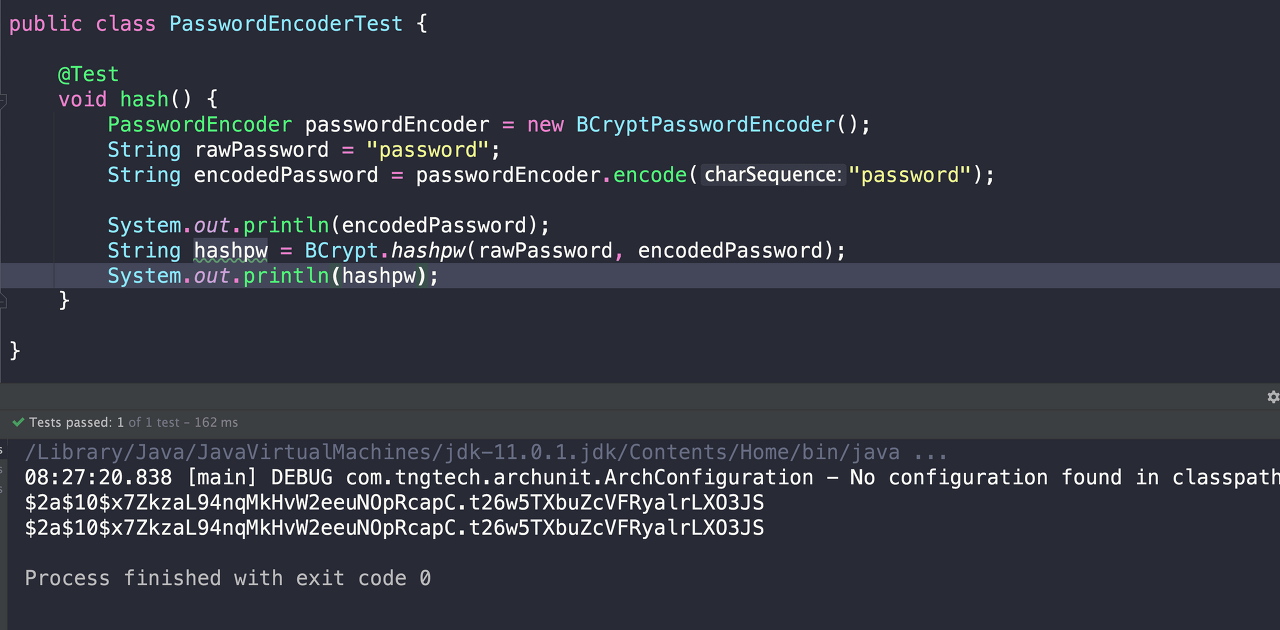
맨날 같은 비밀번호를 쳐도 다른 인코딩결과가 나오는건 알고 있었는데 어떻게 인코딩 결과값을 비교하나 하는 고민이 해결됐다.
Spring Security LogIn
스프링 시큐리티 인증 흐름 작성 포스팅
public void logIn(Account account) {
    // LawPassWord 이용하지 않기 위한 방법
    UsernamePasswordAuthenticationToken token = new UsernamePasswordAuthenticationToken(
            new UserAccount(account),
            account.getPassword(),
            List.of(new SimpleGrantedAuthority("ROLE_USER")));
    SecurityContextHolder.getContext().setAuthentication(token);
}원래는 사용자 정보와 비밀번호 평문으로 AuthenticationToken을 만들어 AuthenticaitonManger의 인증을 받는 방식으로 Spring Secuirty Context에 토큰을 저장하는 인증흐름을 거쳐야 하지만 회원가입, 이메일 인증 후에 바로 로그인한 상태로 홈화면으로 리디렉션하기 위해서는 비밀번호 평문에 접근할 수 없기에 SpringSecurityContext Holder에 바로 토큰을 적용시켜준다.
AuthenticationManager의 절차를 거치지 않아서 위험한 것 vs 비밀번호 평문을 인증 흐름에 넣어서 위험한 것 중 전자를 고른 것// AuthenticationPrincipal, Security User 추가 예정
프론트엔드 라이브러리 NPM 관리, NPM은 빌드툴로 관리
JQuery, BootStrap, Font-Awesome, Jdenticon 등의 라이브러리들을 resourcse/static 내에서 NPM으로 관리
// NPM package.json
{
  "name": "static",
  "version": "1.0.0",
  "description": "",
  "main": "index.js",
  "scripts": {
    "test": "echo \"Error: no test specified\" && exit 1"
  },
  "author": "",
  "license": "ISC",
  "dependencies": {
    "bootstrap": "^4.4.1",
    "font-awesome": "^4.7.0",
    "jdenticon": "^2.2.0",
    "jquery": "^3.4.1"
  }
}
프로젝트 빌드 과정에 NPM 설치, package.json내 프론트엔드 라이브러리 의존성 관리를 추가한다.
// build.gradle
plugins {
	// ...
    id "com.github.node-gradle.node" version "3.1.0"
}

// ...

repositories {
    // ...
    gradlePluginPortal()
}

dependencies {
   // ...
    implementation 'com.github.node-gradle:gradle-node-plugin:3.1.0'

}

node {
    version = '16.15.0' // 사용중인 NodeJS 버젼
    download = true
    nodeModulesDir = file("${projectDir}/src/main/resources/static")

}
task copyFrontLib(type: Copy) {
    from "${projectDir}/src/main/resources/static"
    into "${projectDir}/build/resources/main/static/."
}
copyFrontLib.dependsOn npmInstall
compileJava.dependsOn copyFrontLib

// ...
Thyemleaf Fragments
혼자 프로젝트하면서 하고는 싶었는데 프론트엔드니까 나중으로 미루자고 했지만 사실 못찾아서 못했던 HTML 조립
Fragment.html
<!DOCTYPE html>
<html lang="en" xmlns:th="http://thymeleaf.org"
      xmlns:sec="http://www.thymeleaf.org/extras/spring-security">
<head th:fragment="head"> // fragments 내에 이름지정
  <meta charset="UTF-8">
  <title>Guham</title>
  // 전체 페이지에서 사용할 link, script 모음
  <link rel="stylesheet" href="/node_modules/bootstrap/dist/css/bootstrap.min.css"/>
  <link rel="stylesheet" href="/node_modules/font-awesome/css/font-awesome.min.css">
  <script src="/node_modules/jquery/dist/jquery.min.js"></script>
  <script src="/node_modules/bootstrap/dist/js/bootstrap.bundle.min.js"></script>
  <script src="/node_modules/jdenticon/dist/jdenticon.min.js"></script>
  <style>
    .container{
      max-width: 100%;
    }
  </style>
</head>
</html>Fragments-Use.html
<!DOCTYPE html>
<html lang="en" xmlns:th="http://thymeleaf.org" xmlns:sec="http://www.thymeleaf.org/extras/spring-security">
<head th:replace="fragments::head"> // th:replace -> 현재 elements 대체, th:insert -> 현재 elements 내에 삽입
							//fragments 파일은 templates 내에서 절대경로로 지정
</head>참고
https://www.inflearn.com/course/%EC%8A%A4%ED%94%84%EB%A7%81-JPA-%EC%9B%B9%EC%95%B1/dashboard